Showing posts with label outlook. Show all posts

Sunday, November 30, 2014

Block Outlook from connecting to Public Folder

In some cases, you may need to prevent outlook to connect to Exchange Public Folder.
I had a case where Outlook 2010/2013 is connecting to a remote exchange server, connecting to public folder cause some connection delay.
These client dont need to use Exchange Public Folder, so its better to disable Public Folder Connection.

Now you have 2 options:
1- Delete Public Folder.
2- Prevent Outlook from connecting to public folder

Today I will talk about how to prevent outlook 2010/2013 from connecting to Public Folder.

To do so you will need to create/edit a small registry value called
Name: HasPublicFolders
Value: 0
Type: DWORD

The Path for this value is HKEY_CURRENT_USER\Software\Microsoft\Exchange\Setup
If the Setup Key is not exist, then simply create it and then create the DWORD value
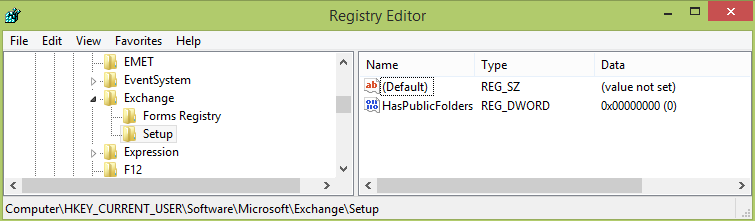

You can automatically create the key and the value using the following CMD line

reg add HKCU\Software\Microsoft\Exchange\Setup /f /v HasPublicFolders /t REG_DWORD /d 0 

The line is explained as the following
REG: is the cmd registry controling tool 
ADD: parameter to tell the reg tool that you are adding / creating a key or a value
HKCU...: The path of the key you want to create the value under, if the key is not exist then it will be created
/f : To force overwrite the value if exist
/v: Value Name
/t: Type of the value
/d: parameter after the /d is the value of the entry, in this case it is 0

for more information about REG tool you click here (http://technet.microsoft.com/en-us/library/cc732643.aspx)


Hope you like it, feel free to leave you comment below and share it with your friend to support me :)

Thursday, October 31, 2013

Error message when Outlook clients synchronize an OAB with Exchange 2007: "0x80190193"

There are several cause for 0x80190193, generally this error mean that it fail to download the Offline Address Book from Microsoft Exchange server.
the most common reason for this is that OAB is requiring HTTPS connection, and outlook using not using HTTP connection, How to know ?
Hold the CTRL key and Right Click on Microsoft Outlook tray icon and select Test E-mail Autoconfiguration.


Notice that OAB URL is using HTTP. so now lets check it on the server side
Login to Exchange server that had Client Access Server
- Open IIS --> Default WebSite --> and click on OAB virtual directory
on the Feature View panel click on SSL Settings and make sure that Require SSL is deselected


open CMD and type IISRESET, Make sure that the services are back to normal using powershell command Test-ServiceHealth
You have to do this on all CAS server you have.
Thats it, enjoy your day.
These errors can also caused by bad autodiscover configuration or SSL problem, alot of reason, but this one I write is the common

Monday, August 26, 2013

Outlook freeze on send/receive tab

There is a problem that some time happen on Outlook 2010, that is when you open the Send/Receive Tab it simply freeze for some time before the tab respone.

The Fix for this problem is simply to Start the Telephony Service from the service,